Validate a Benefit Plan
Prove that the plan resolves for the intended date, presents understandable benefits, and drives a synthetic claim to the expected cost-sharing result.
The member view confirms what the plan says on a specific date. A real synthetic 837 confirms what the adjudication pipeline does with that exact plan. Use both before considering configuration complete.
1. Run the Configuration Checks
- Open Configuration → Benefit Plans.
- Open the plan you want to prove and select Validation.
- Choose the intended service date, then select Refresh validation.
The portal checks effective dates, publication state, covered benefits, network tiers and identifiers, exclusions, and the date-sensitive member view. The snapshot also shows the deductible, out-of-pocket maximum, and accumulator model that a member experience would receive.
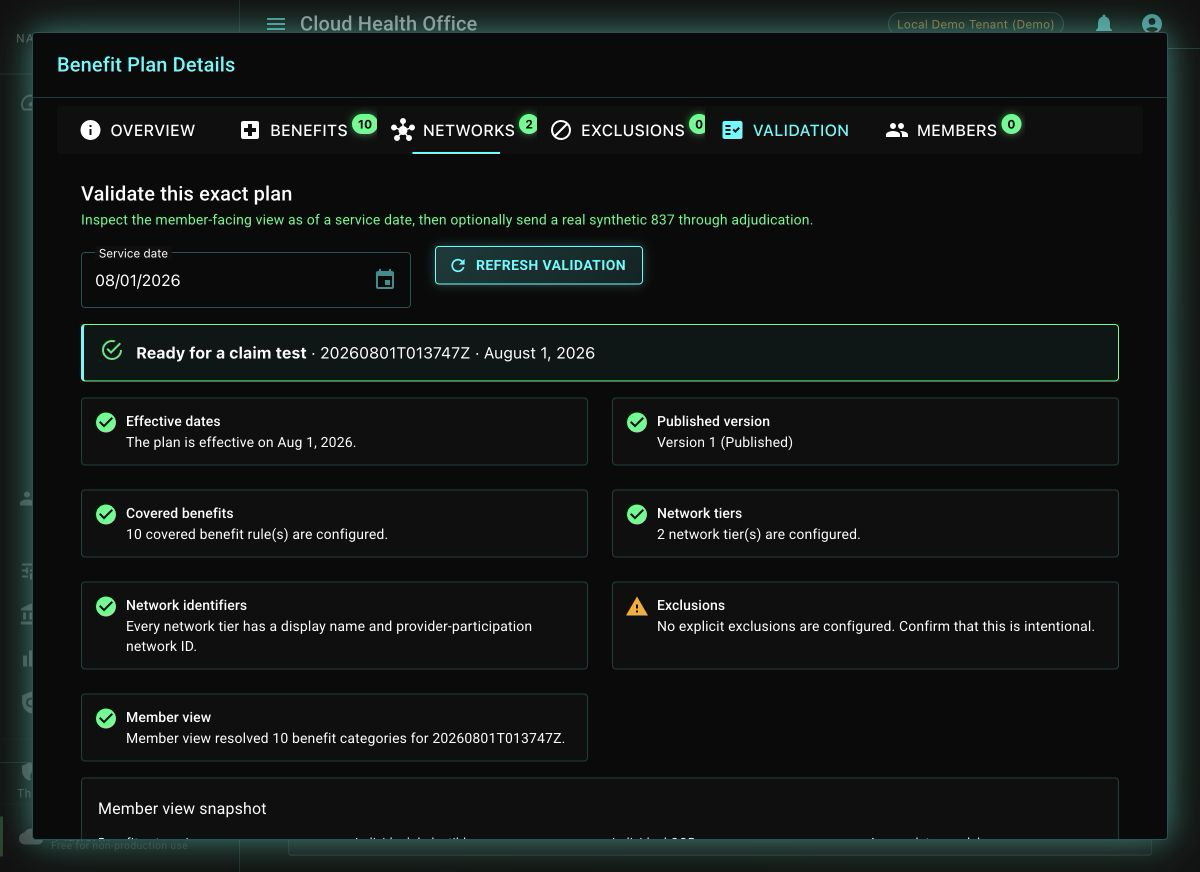
A warning does not always block testing. For example, a plan may intentionally have no explicit exclusions. Record that decision instead of treating every warning as an error.
2. Send a Plan-Specific Synthetic 837
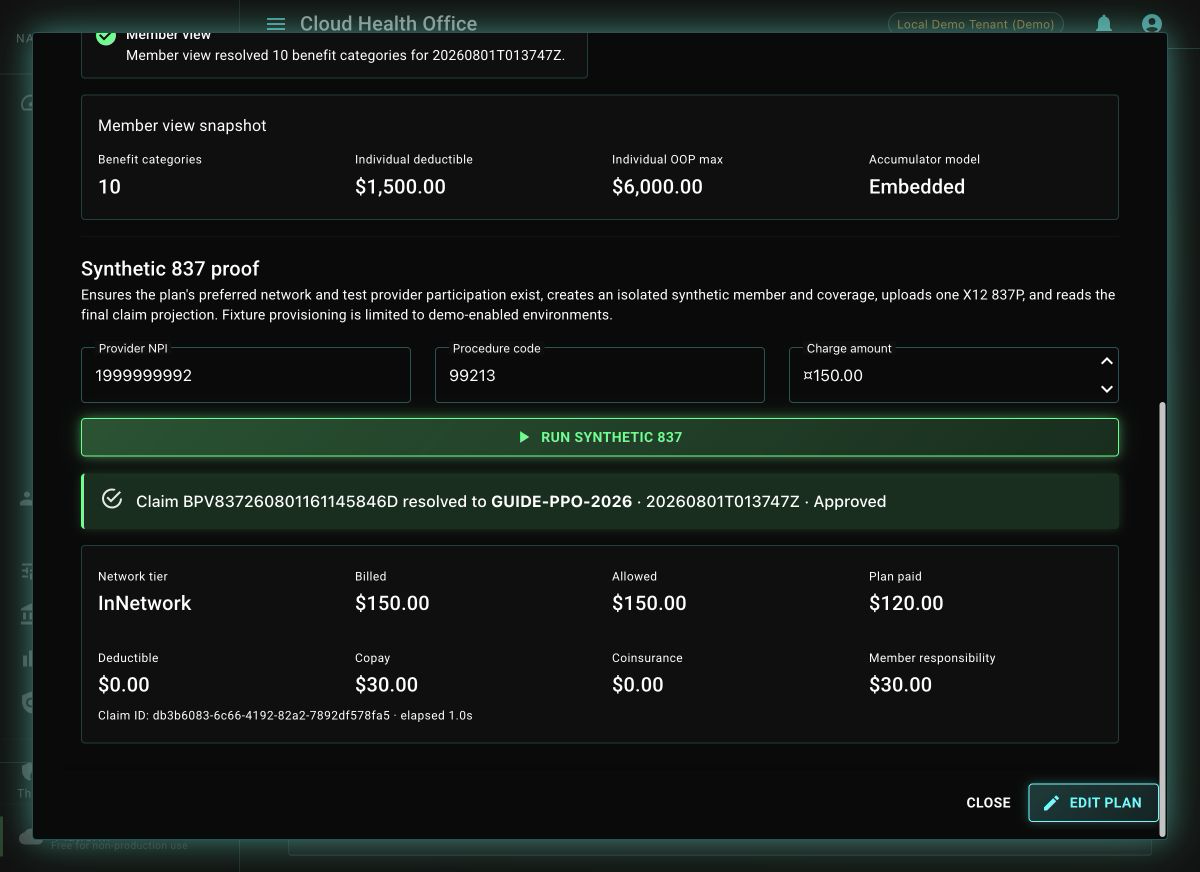
In the Synthetic 837 proof section, confirm the test provider NPI, procedure code, and charge, then select Run synthetic 837. The demo workflow provisions isolated synthetic member, coverage, provider-network participation, and network fixtures when needed; uploads an actual X12 837P; and waits for the ordinary claim projection.
This is materially stronger than a calculator preview: the claim passes through the same intake, validation, plan resolution, provider gates, benefit calculation, disposition, and persistence stages used by other claims.
The write-producing test is available automatically in Development and Local Demo. In another approved demo environment, enable Features:BenefitPlanSyntheticValidationEnabled. It is off by default in production-style environments and is not invoked by Million Claim Challenge runs.
3. Read the Result
First confirm that Resolved plan matches the plan you opened. Then review the terminal claim status, network tier, billed and allowed amounts, plan payment, deductible, copay, coinsurance, and member responsibility. A denied or pended result can still prove that the pipeline is healthy when the reason reflects an intentional business or integrity rule.
| Evidence | What it proves |
|---|---|
| Exact plan ID and version | Coverage resolution did not silently select a fallback plan. |
| Network tier | Provider participation mapped to the intended plan network. |
| Allowed and paid amounts | Pricing and payer liability completed. |
| Deductible, copay, and coinsurance | The configured benefit rule and accumulators drove member cost sharing. |
| Outcome reason and claim ID | Operators can explain the disposition and continue into the full claim trace. |
The configuration checks are explainable, the member view matches the design, and the synthetic 837 resolves the selected plan version with a traceable adjudication result.
Refresh the Screenshots with Playwright
The checked-in browser workflow can reproduce the plan screenshots from synthetic local data:
npm install
GUIDE_PLAN_ID=GUIDE-PPO-2026 npm run guides:capture:benefit-plans
The workflow replaces the images under src/site/graphics/user-guides/benefit-plans/, including the configuration checks and final synthetic-claim evidence.
Troubleshooting
| Symptom | Likely cause |
|---|---|
| Member view does not resolve | Plan ID, tenant, publication state, or service date does not select an effective version. |
| Synthetic button is unavailable | The environment is neither Development nor Local Demo and the explicit feature flag is off. |
| Claim resolves a different plan | Inspect the synthetic coverage and exact plan ID before reviewing benefit rules. |
| Network tier is not assigned | Review provider participation, the plan tier’s network ID, and participation effective dates. |
| Claim is pended or denied | Read the displayed reason and full adjudication trace; provider-integrity and other fail-closed gates may be working as designed. |
| Unexpected cost sharing | Inspect the selected service category, network tier, rule applicability, and accumulator state. |