FHIR APIs for Health Plans
The Cloud Health Office payer API reference: FHIR R4 APIs for CMS-0057-F interoperability, prior authorization, terminology, and administration workflows — with OpenAPI 3.1 specs, OAuth 2.0 / SMART on FHIR security, and Da Vinci-aligned resource profiles. Run them locally or deploy into your own environment.
What is the Cloud Health Office FHIR API?
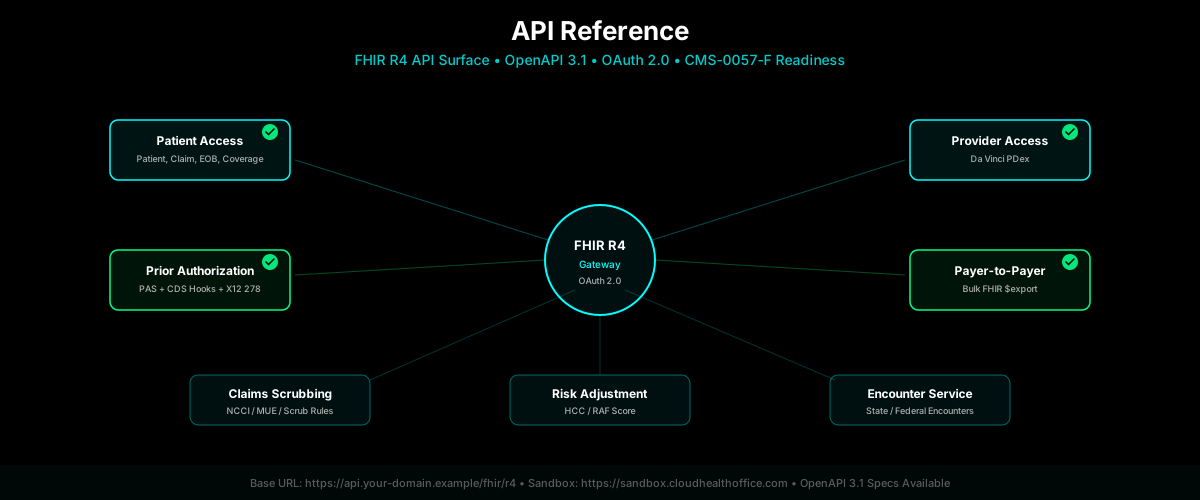
The Cloud Health Office FHIR API is a set of HL7 FHIR R4 interfaces built for payer interoperability and administration, not a generic FHIR server. It exposes CMS-0057-F-oriented capabilities — Patient Access, Provider Access, Payer-to-Payer, and Prior Authorization — secured with SMART on FHIR/OAuth 2.0, together with FHIR prior authorization workflows (CRD, DTR, PAS), terminology services, and the eligibility, benefits, provider, authorization, and claims domains behind them. Because the administration logic lives in the platform, Cloud Health Office can operate alongside an existing payer core such as QNXT, Facets, or HealthEdge, or serve as the payer backend itself. The external FHIR contract stays the same in either model.
FHIR API Quick Answers
Direct answers to the questions payer architects ask about FHIR APIs, CMS-0057-F, and where Cloud Health Office fits. Each answer stands alone and links deeper where documentation exists.
What is a FHIR API for a health plan?
A FHIR API for a health plan is a standards-based HL7 FHIR R4 interface that exposes payer data — members, coverage, claims, prior authorizations, and provider directories — as structured resources over HTTPS. Providers, member apps, and other payers read and write that data through predictable endpoints secured with OAuth 2.0 and SMART on FHIR scopes. For payers, FHIR is the external contract that CMS-0057-F requires: it standardizes how the outside world reaches plan data, while the plan's own systems remain the source of record behind it.
What FHIR APIs are relevant to CMS-0057-F?
CMS-0057-F centers on four FHIR R4 APIs: the Patient Access API (member access to claims, encounters, and clinical data), the Provider Access API (member data to in-network providers), the Payer-to-Payer API (data exchange when members change plans), and the Prior Authorization API (status, decisions, and rationale). It also builds on the Provider Directory API and expects SMART on FHIR/OAuth security. Cloud Health Office provides technical capability across all of these; production readiness and scope vary by capability, tracked in the CMS-0057-F readiness record.
Is Cloud Health Office a FHIR server or an API gateway?
Both, and more. Cloud Health Office serves FHIR R4 resources and can act as the FHIR gateway in front of an existing core, but it is not only a generic FHIR server. It is a payer administration and interoperability platform: behind the FHIR contract it carries eligibility, benefits, provider, prior authorization, claims, accumulator, and terminology logic. That lets it either sit alongside a core such as QNXT, Facets, or HealthEdge as an interoperability layer, or serve as the payer backend itself. See the platform overview.
Does Cloud Health Office support SMART on FHIR?
Yes. Cloud Health Office implements SMART on FHIR/OAuth 2.0 as an implemented technical capability. The FHIR server publishes a SMART App Launch v2 configuration at /.well-known/smart-configuration and enforces scopes such as patient/*.read, user/*.read, and system/*.read through scope-enforcement middleware, so patient-scoped tokens are bound to patient resource access. Production deployment still requires issuer and client registration, an identity model, third-party app registration, and audit controls, which are configured per payer during onboarding.
How does FHIR prior authorization work?
FHIR prior authorization moves the request off phone and fax and onto structured resources. At the point of order, Coverage Requirements Discovery (CRD) tells the provider whether authorization is needed; Documentation Templates and Rules (DTR) gathers the required clinical documentation with FHIR Questionnaires; and Prior Authorization Support (PAS) submits the request and returns the decision. Cloud Health Office implements the PAS Claim/$submit operation per PAS IG v2.1.0, backed by a prior authorization rule engine and authorization service. Payer rules and utilization-management policy are configured during implementation. See the prior authorization guide.
How do CRD, DTR, and PAS relate to the Prior Authorization API?
CRD, DTR, and PAS are the three Da Vinci Implementation Guides that make up the prior authorization workflow behind the CMS-0057-F Prior Authorization API. CRD discovers whether authorization and documentation are required, DTR collects that documentation, and PAS carries the actual submission and decision — PAS is the API that returns approval, denial, or a request for information. Cloud Health Office provides CRD and DTR services and an implemented PAS submission surface; each is configured with payer-specific rules and questionnaires during onboarding. The architecture article walks the full flow.
Does Cloud Health Office support Bulk FHIR?
Yes, as an implemented foundation. Cloud Health Office exposes asynchronous Bulk Data ($export) operations at the system and group level, following the FHIR Bulk Data Access pattern with a kickoff request, a status poll, and downloadable output. This underpins population-level export for Provider Access and Payer-to-Payer use. The current export path is a technical scaffold: production use requires storage, encryption, lifecycle management, manifest retention, and recipient access controls, which are implementation work rather than turnkey features.
Can Cloud Health Office connect FHIR APIs to QNXT, Facets, or HealthEdge?
Yes, through a vendor-neutral adapter configured per deployment — not through a single universal connector for every QNXT, Facets, or HealthEdge environment. The external FHIR contract stays stable while the integration behind it is selected and configured for each payer's authoritative sources: member, benefit, provider, and authorization systems, the UM platform, claims dependencies, and any required write-back. Onboarding identifies those sources and the available APIs, events, and middleware, then wires the adapter so FHIR resources project from live systems of record.
Can Cloud Health Office operate without a legacy core?
Yes. Beyond the interoperability layer, Cloud Health Office includes the engines a payer core requires — eligibility, benefits, provider data, prior authorization, claims adjudication, accumulators, and terminology — so it can serve as the payer backend itself rather than only fronting another system. Payers can also modernize progressively: start with Cloud Health Office as the FHIR and prior authorization layer beside an existing core, then migrate individual domains onto it over time. The same external FHIR contract holds across both deployment models.
Payer FHIR API Capabilities
The FHIR surfaces most relevant to health plans, with a readiness label for each. Labels follow the internal CMS-0057-F readiness matrix: Implemented means code and tests exist and the capability can be demonstrated; Integration required means the surface exists but production use depends on wiring payer sources and controls; Phase 2 means known work remains before it should be represented as production-ready.
Patient Access API
Member-facing access to their own data: demographics, coverage and benefits, claims and encounter information (X12 837/835 projected to FHIR Claim/EOB), and clinical resources where available. Secured with SMART/OAuth patient scopes. The FHIR surface and scope enforcement are in place; production breadth depends on payer identity, consent, and source-system integration.
Provider Access API
Provider-authorized access to attributed members' clinical and claims data, with Da Vinci PDex-aligned resources and $member-match. The SMART/FHIR and provider-resource foundation exists; attributed-access logic, patient opt-out, and payer-specific data-minimization are implementation work configured per deployment.
Payer-to-Payer API
Member data exchange when a member changes plans. Cloud Health Office provides Bulk FHIR and consent building blocks, but end-to-end opt-in, five-year historical scoping, outbound/inbound exchange workflow, and receiving-payer audit remain a Phase 2 implementation workstream — this is not represented as turnkey production-ready.
Prior Authorization API
Da Vinci-aligned prior authorization spanning requirement discovery (CRD), documentation (DTR), submission (PAS Claim/$submit), and decision. Outcomes include approval, denial, and request for information. The PAS surface, auto-adjudication/pending behavior, and authorization persistence are implemented; payer rules, UM policy, attachments, and denial governance are configured during onboarding. See the prior authorization guide.
Provider Directory API
FHIR Practitioner, PractitionerRole, and Organization projections plus a provider-directory surface — one of Cloud Health Office's stronger readiness areas. Production readiness depends on network/source-system freshness, endpoint publication, and directory-update operations.
Bulk FHIR
Asynchronous, population-level Bulk Data $export at system and group level following the FHIR async pattern (kickoff → status poll → output). The export foundation is implemented; production use requires storage, encryption, lifecycle, manifest retention, and recipient access controls.
FHIR Prior Authorization in Cloud Health Office
Prior authorization is a first-class workflow, not a single endpoint. A request flows from the provider's EHR through requirement discovery, terminology translation, and rule evaluation, into documentation and submission, and out to a recorded decision:
- Provider / EHR
- CRD
- Terminology
- Prior Auth Rule Engine
- DTR
- PAS
- Authorization Decision
- Authorization Service
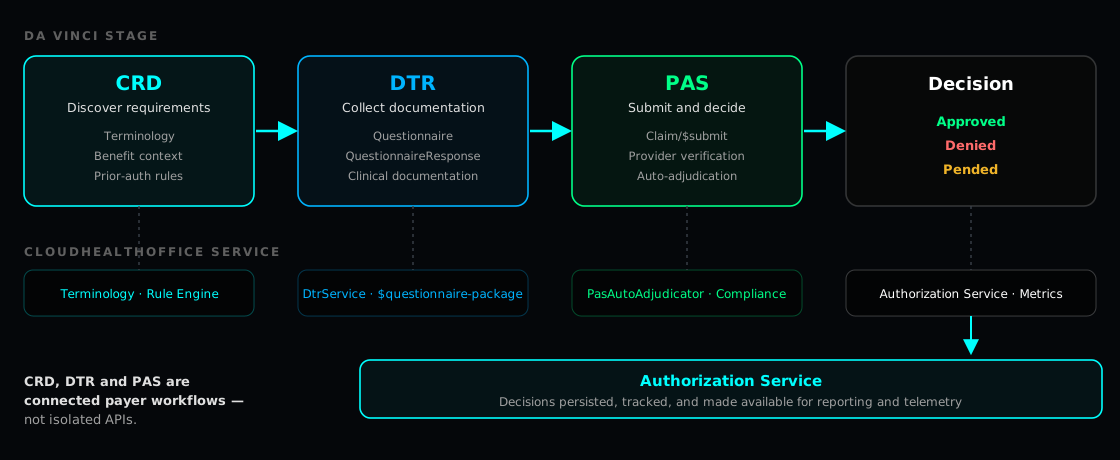
- CRD (Coverage Requirements Discovery) — at order time, tells the provider whether prior authorization and documentation are required, via CDS Hooks. Available for payer-specific rule configuration.
- Terminology services — translate clinical codes (SNOMED CT, LOINC) to the payer's CPT/ICD-10-CM code space via
ConceptMap/$translate, so rules and benefits match the request. See the terminology crosswalk guide. - Prior authorization rules — a rule engine evaluates coverage and medical-necessity policy against the (translated) request to drive the decision path.
- DTR (Documentation Templates and Rules) — collects required clinical documentation using FHIR Questionnaire and QuestionnaireResponse; available as an implementation module with payer-specific questionnaires.
- PAS (Prior Authorization Support) — submits the request through
Claim/$submit(per PAS IG v2.1.0) and returns a structured decision; auto-adjudication and pended-status behavior are implemented. - Authorization decision & service — approval, denial, or request-for-information outcomes are recorded and tracked by the authorization service; decision-window tracking and structured denial/status data are implemented, with payer denial taxonomy and reviewer workflow configured per deployment.
For the architecture in context, see CMS-0057-F with QNXT, Facets, or HealthEdge and the CMS-0057-F insights hub.
A FHIR API Is Only the External Contract
FHIR endpoints standardize how the outside world reaches a plan, but every endpoint is backed by payer business logic and data: eligibility, benefits, provider networks, authorization rules, clinical policy, claims, accumulators, terminology, identity and security, and audit. A FHIR server with no payer logic behind it cannot answer a coverage question or adjudicate a prior authorization. Cloud Health Office supplies that logic, in one of two deployment models.
Two deployment models
Cloud Health Office alongside an existing core
↓
Cloud Health Office
↓
QNXT / Facets / HealthEdge / UM / enterprise systems
The core stays the system of record. Cloud Health Office is the FHIR, SMART/OAuth, prior authorization, terminology, and audit layer on top of it.
Cloud Health Office as the payer backend
↓
Cloud Health Office
↓
Membership / eligibility / benefits / providers / prior authorization / claims / accumulators
Cloud Health Office owns the administration domains directly, either from day one or progressively as domains migrate off a legacy core.
Connecting FHIR to Existing Payer Systems
Cloud Health Office does not ship one universal connector for every QNXT, Facets, or HealthEdge environment. Two payers on the same core can have very different data ownership, identity, and utilization-management topologies, so the payer-specific adapter is selected and configured during onboarding. Onboarding identifies:
- Authoritative member source
- Benefit source
- Provider source
- Authorization source
- UM platform
- Claims dependencies
- Integration middleware
- Available APIs
- Event and message infrastructure
- Required write-back
The external FHIR contract remains stable while the payer-specific integration behind it can vary by organization. Apps and partners integrate once against FHIR; the adapter work happens behind it. See the architecture documentation for the adapter model.
Environments
| Environment | Base URL | Auth |
|---|---|---|
| Your deployment | https://api.your-domain.example/fhir/r4 | OAuth 2.0 (Azure AD) |
| Hosted pilot | Assigned during pilot setup | Customer tenant identity |
| Local Dev | http://localhost:3000/fhir/r4 | Bearer test-token |
OpenAPI docs are available from the local or customer-deployed API surface. All requests require an X-Tenant-ID header for multi-tenant routing.
Authentication
Customer-deployed APIs use OAuth 2.0 with Azure AD (Microsoft Entra ID). The FHIR server publishes a SMART App Launch v2 configuration at /.well-known/smart-configuration with supported scopes including patient/*.read, user/*.read, and system/*.read.
# Discover SMART/OAuth endpoints and supported scopes
curl https://api.your-domain.example/fhir/r4/.well-known/smart-configuration

# Get access token (client credentials)
curl -X POST https://login.microsoftonline.com/{tenant}/oauth2/v2.0/token \
  -d "grant_type=client_credentials" \
  -d "client_id={client_id}" \
  -d "client_secret={client_secret}" \
  -d "scope=api://cloudhealthoffice/.default"

# Read a FHIR resource with the token + tenant header
curl https://api.your-domain.example/fhir/r4/Patient/{id} \
  -H "Authorization: Bearer {access_token}" \
  -H "X-Tenant-ID: {tenant}"
Patient Access API
CMS-9115-F and CMS-0057-F oriented. Enables patients to access their own health data via FHIR, secured with SMART patient scopes.
| Endpoint | Method | Description |
|---|---|---|
/Patient/{id} | GET | Patient demographics and contact information |
/Coverage?patient={id} | GET | Active benefits and eligibility |
/Claim?patient={id} | GET | Claims history (X12 837 → FHIR Claim) |
/ExplanationOfBenefit?patient={id} | GET | Payment details (X12 835 → FHIR EOB) |
/Encounter?patient={id} | GET | Healthcare visits and services |
/Condition?patient={id} | GET | Diagnoses and clinical conditions |
Provider Access API
Gives in-network providers access to attributed members' clinical and claims data, with Da Vinci PDex-aligned resource profiles.
| Endpoint | Method | Description |
|---|---|---|
/Patient/$member-match | POST | Match patient across payers without sharing raw identifiers |
/Group/{id}/$export | POST | Bulk FHIR export for attributed members |
Prior Authorization API
Moves prior authorization from phone/fax to real-time FHIR, Da Vinci-aligned across PAS, CRD, and DTR, with bidirectional X12 278 mapping. The PAS Claim/$submit operation is implemented per PAS IG v2.1.0.
| Endpoint | Method | Description |
|---|---|---|
/Claim/$submit | POST | Submit prior auth request (X12 278 → FHIR) |
/Claim/$inquire | POST | Check prior auth status |
/Claim/{id}/$cancel | POST | Cancel existing prior auth |
/Subscription | POST | Subscribe to auth status updates |
# Submit a prior authorization (Da Vinci PAS Claim/$submit)
curl -X POST https://api.your-domain.example/fhir/r4/Claim/\$submit \
  -H "Authorization: Bearer {access_token}" \
  -H "X-Tenant-ID: {tenant}" \
  -H "Content-Type: application/fhir+json" \
  -d '{"resourceType":"Bundle","type":"collection","entry":[{"resource":{"resourceType":"Claim","use":"preauthorization"}}]}'

# Translate a clinical code to the payer code space (terminology service)
curl "https://api.your-domain.example/fhir/ConceptMap/\$translate?system=http://snomed.info/sct&code=44054006&target=http://hl7.org/fhir/sid/icd-10-cm" \
  -H "Authorization: Bearer {access_token}" \
  -H "X-Tenant-ID: {tenant}"
Payer-to-Payer API
Enables data exchange when members switch health plans, using Bulk FHIR $export and member matching. Payer-to-payer is a Phase 2 implementation workstream (see the capability readiness above), not a turnkey production claim.
| Endpoint | Method | Description |
|---|---|---|
/Patient/$member-match | POST | Identify member in source payer system |
/Patient/{id}/$everything | GET | Complete member record transfer |
/Group/$export | POST | Bulk transfer for member cohorts |
# Initiate an asynchronous bulk export (FHIR Bulk Data Access)
curl -X POST https://api.your-domain.example/fhir/r4/Group/{groupId}/\$export \
  -H "Authorization: Bearer {access_token}" \
  -H "X-Tenant-ID: {tenant}" \
  -H "Prefer: respond-async"
# → 202 Accepted with a Content-Location header to poll for job status
Operational APIs
Claims Scrubbing
NCCI/MUE edit checking, CPT validation, diagnosis code verification, and custom payer scrub rules.
Risk Adjustment
HCC (Hierarchical Condition Category) coding and RAF (Risk Adjustment Factor) score calculation for Medicare Advantage and ACA risk adjustment.
Encounter Service
State and federal encounter submission management for Medicaid MCOs, including encounter data validation, submission tracking, and reconciliation.
Full OpenAPI 3.1 specifications for all seven APIs are in the api/openapi directory on GitHub, and the FHIR services that implement them live under src/services/fhir-service. Explore the specs interactively in the API Sandbox. For requirements context, see the CMS-0057-F compliance overview and the CMS-0057-F compliance page.
Planning a Payer FHIR Implementation?
A payer FHIR architecture depends on your specifics: your existing CAPS/core, who owns each data domain, your identity provider, your utilization-management and provider systems, your CMS scope (Medicare Advantage, Medicaid, CHIP, or QHP), and your migration strategy. The FHIR contract is standard; the integration behind it is designed around those answers.
Review CMS-0057-F architecture
How the required FHIR APIs, prior authorization, and terminology fit a payer stack — alongside a core or as the backend.
CMS-0057-F compliance →Explore the payer platform
The administration domains behind the FHIR contract: eligibility, benefits, providers, prior authorization, claims, and accumulators.
Platform overview →Discuss your payer architecture
Talk through your core, data ownership, and CMS scope to scope an integration and deployment model.
Contact us →